How to Update Components
Learn how to get the latest features and bug fixes for your Framer CMS Filter components directly from the Assets panel.
Updating is simple
We regularly release updates to fix bugs, improve performance, and add new features. Because the components live in your Framer project, you can update them directly from the Assets panel.
Follow these steps:
- 1Open your projectGo to the Framer project where you are using the plugin.
- 2Open the Assets panelClick on the Assets tab in the left sidebar.
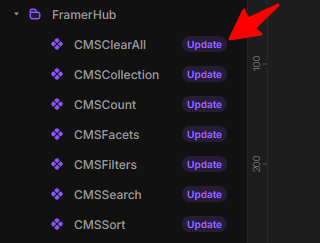
- 3Find FramerHub componentsLocate the FramerHub folder (or wherever you saved the components).
- 4Click UpdateLook for components with a blue dot or "Update" button next to them. Click to update.
Frequently Asked Questions
Will updating break my existing filters?
No. Updates are designed to be backward compatible. Your connected fields, styling options, and logic will remain intact.
I don't see an update button?
If you don't see an update button or indicator in the Assets panel, you are likely already on the latest version.
Do I need to re-copy components from the website?
No. Once you have the components in your project, use the Assets panel to update them. You only need to copy from the website if you are adding a completely new component type you haven't used before.